Review Pending Items in the Inbox
Clear new places, events and suggested edits from one queue.
The Inbox collects everything that waits on you. In the sidebar it sits under Dashboard, and the number beside it counts the waiting items plus any unread notes from Vibemap. The page subtitle repeats the total: "12 things need you."
For a long review session, click Review in bulk →. It opens the Places or Events page on the Pending tab, in Review Mode.
What lands in the Inbox
Chips across the top filter the queue. Each shows its count.
| Chip | What it lists |
|---|---|
| All | A preview of every group below, up to five items each. |
| Events | Upcoming events nobody has reviewed yet. They won't show on your calendar until you approve them. Past events drop out. |
| Places | Places nobody has reviewed yet. They wait for your OK before they go live. |
| Suggested edits | Changes visitors proposed for your places. Appears only if your account includes Suggested Edits. |
| From Vibemap | Notes from the Vibemap team. Appears only when there is a note. |
The Inbox covers the same places and events as your Places and Events pages: your active list, or your organization's area when no list is active. The most recently changed items sit at the top.
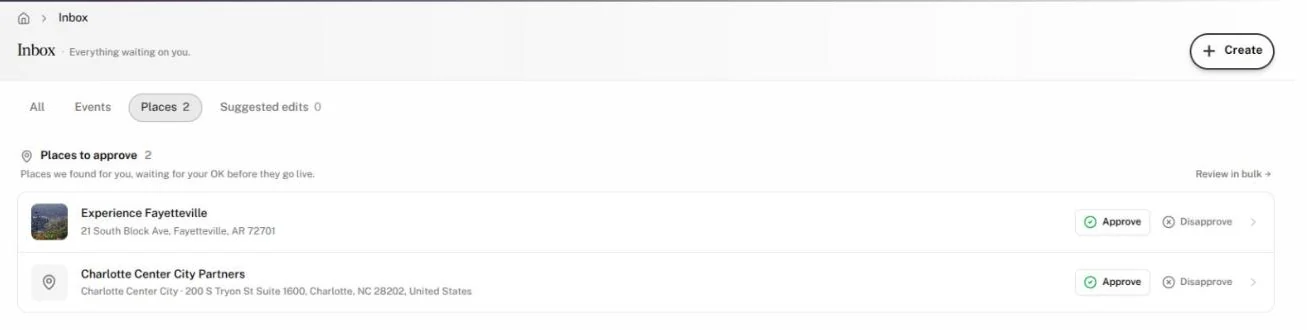
Approve or disapprove an item
- In the sidebar, click Inbox.
- Click a chip, or stay on All. On All, click See all N → to list a whole group.
- On a row, click Approve or Disapprove. On a suggested edit the second button reads Decline.
The row leaves the queue at once. For an event or place, the confirmation offers Undo, which returns the item to Pending. A suggested-edit review is final.
Each row shows a photo, the name and a line of detail: the date and venue for an event, the neighborhood and address for a place, or the change, sender and date for a suggestion. Up to two tags follow the name:
- Today, Tomorrow or In 3 days when an event starts within three days.
- Submitted when a visitor or partner sent you the event.
- Recurring for a repeating event.
Approve on a suggested edit applies every proposed change. To accept some changes and decline others, click the item's name instead; it opens in Suggested Edits, where you choose field by field. See Review suggested edits.
Recurring events
A recurring event shows as one row. Click Recurring · show dates under its name to list its next dates. Approving or disapproving the row applies to the whole series, every date.
To list each date as its own row, click the Events chip and turn on All occurrences.
Open the full record
- Click an item's name to open it: the place or event in the Hub, or the suggestion in Suggested Edits.
- Click Review in bulk → beside a group to work through it on the Places or Events page. For suggested edits, the link opens Suggested Edits.
- On a single chip, click Load more at the bottom to list more items.
Read notes from Vibemap
The From Vibemap group holds notes the Vibemap team sends your organization, such as a new feature or a task to finish. A note may carry a link; click it to go there. Click the X on a note to dismiss it.
Inbox zero
When every group is empty, the Inbox shows Inbox zero and "You're all caught up." A chip that is clear while another still has items reads "No places waiting on you." (or events, or suggested edits) and links to the chip that still needs you, such as Events still need you →.
A group's header shows N new for the items that changed since your previous visit in this browser, and each new row carries a dot. Your first visit shows no "new" marks.
Why isn't an item here?
| You see | Why | What to do |
|---|---|---|
| An event you expected is missing | The Inbox lists upcoming Pending events only. | Find it on the Events page under Approved, Disapproved or All. |
| A place you expected is missing | Someone already reviewed it, or it falls outside your active list or area. | Find it on Places with the All tab, or switch lists. |
| More pending places than your public directory would show | The Inbox lists every pending place your list covers, including ones its quality rules keep off the public directory. | Review them anyway. Approval and the list's quality rules are separate. |
| No Suggested edits chip | Your account does not include Suggested Edits. | Contact Vibemap. |
| Approve is greyed out on a suggestion | The suggestion carries nothing to apply, such as photos that never finished uploading. | Click Decline. |
| "Events aren’t set up for this organization yet." | Your organization has no list or area set for that type. | Contact Vibemap. |
| "Couldn’t load places." | A temporary error. Your pending items are unaffected. | Click Retry. |