Read the Places Pipeline
The Places Pipeline is off by default. Ask your Vibemap contact to turn it on for your organization.
See how many of your places reach the public map, and what you can do about the rest.
In the sidebar, under Tools, click Places Pipeline. The report covers your whole organization.
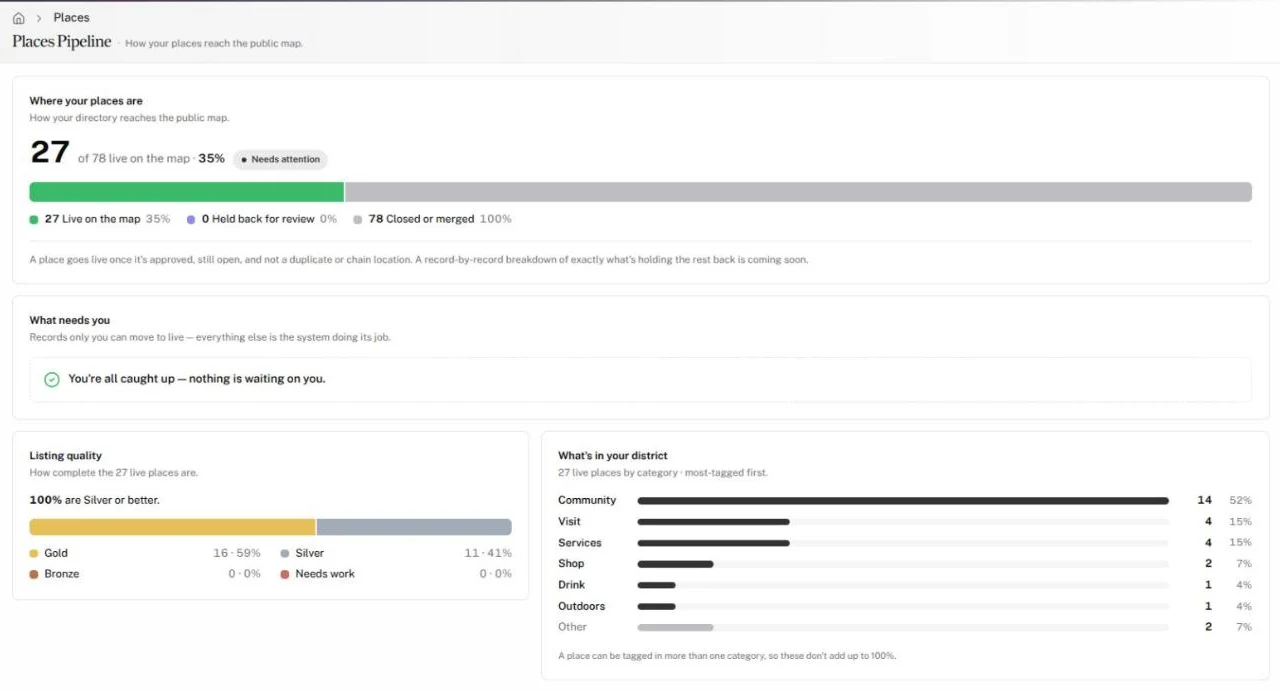
Where your places are
The first card leads with the number of places live on your map, out of every place Vibemap found in your area, and that share as a percentage. A badge rates it:
| Badge | Share live |
|---|---|
| Healthy | 75% or more |
| Worth a look | 50% to 74% |
| Needs attention | Below 50% |
| Nothing to review yet | No places in your area yet |
The bar splits every place found into three groups:
- Live on the map
- Held back for review: open and unique, but not live yet.
- Closed or merged: closed, or a duplicate of another place.
A place goes live once it's approved, still open, and not a duplicate or chain location.
What needs you
This card lists only what you can move to live. Each row has a button:
| Row | Means | Button opens |
|---|---|---|
| Review queue | Places Vibemap found for you, waiting for your approval. | Your pending places |
| Just need a photo | Places that pass every rule but need one photo to go live. | The Places table |
| Outside your boundary | Venues just outside your boundary. Check that your boundary is right. | The Places table |
With nothing waiting, the card reads "You're all caught up — nothing is waiting on you."
To approve places, see Manage Your Places. To change your boundary, see Set Up Your Organization Page.
Listing quality
How complete your live places are, and the share that reach Silver or better. Each place earns a tier by how complete its listing is:
| Tier | Listing complete |
|---|---|
| Gold | 85% or more |
| Silver | 65% to 84% |
| Bronze | 40% to 64% |
| Needs work | Below 40% |
What's in your district
Your live places by category, most-tagged first. The smaller categories fold into one Other row. A place can carry more than one category, so the rows don't add up to 100%.
Gotchas
- The report always covers your whole organization. If you pick a list other than your default, a note says the numbers are still for the whole organization.
- If the report can't load, it says why, such as "No pipeline data for this organization yet."