Share Your Lists as Campaigns
The Campaigns page is off by default. Ask your Vibemap contact to turn it on for your organization.
Spotlight a season, a neighborhood or a theme with a list of its own, and share its link.
For now, each list is its own campaign. The page shows every list your organization publishes beyond its default directory, that is, every list except your default places and events lists. The Hub marks grouping several lists into one campaign Coming soon.
In the sidebar, open Campaigns and click All Campaigns.
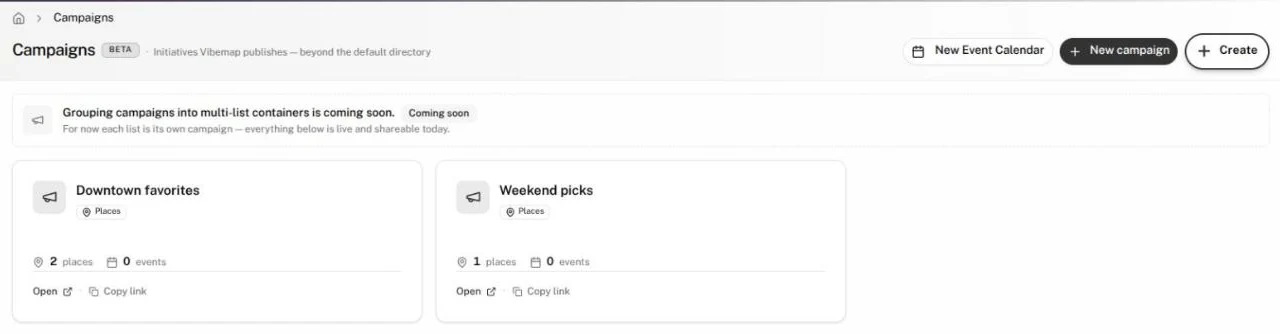
Read the page
Each card is one list. It shows:
- the list's name: click it to open the list;
- Places or Events, plus Smart for a Smart list;
- how many places and events it holds;
- Open, which opens the list's public page, and Copy link, which copies that page's address.
Start a campaign
- Click New campaign, or New Event Calendar to start an events list.
- Build the list in the wizard, as in Create a list.
- The Hub creates the list and opens it. The Your list is ready window offers Create a map, Edit list and, for an events list, Create a calendar.
The new list appears on the Campaigns page. If you cancel the wizard, it returns you to Campaigns.
Share a campaign
- Click Copy link on its card and paste it into a post, newsletter or email.
- For embed code, open the list and use its Share tab. See Use, share or export a list.
- To show it on your site as a map or a calendar, build one from the list: see Maps and Calendars.
If your account has the Newsletter Tool, it sits under Campaigns too, in Share. See Newsletter Tool.
Gotchas
- A campaign is its list. Editing the list changes the campaign and every map and calendar that uses it.
- Your default places and events lists never appear here; they are your directory.
- An old link to a single campaign, or to the campaign form, shows Campaigns aren't available yet. Click Back to campaigns, or use the button beside it to create a single-list campaign with the wizard.