Read Your Dashboard
See the health of your directory and calendar at a glance, and jump to the work that needs you.
The Dashboard opens when you sign in to the Hub. Its subtitle names the organization you manage and when Vibemap last refreshed its data ("Managing Downtown Example · synced 2 hours ago").
To add a place or event, click Create at the top right, then Place or Event.
The two columns
The Dashboard shows a Place Directory column, an Event Calendar column, or both, depending on the products your organization has.
Each column opens with a banner:
- The scope. The name of the active list, with a star if it is your default list, or your boundary's name followed by (Boundary). Click the list name to open the list.
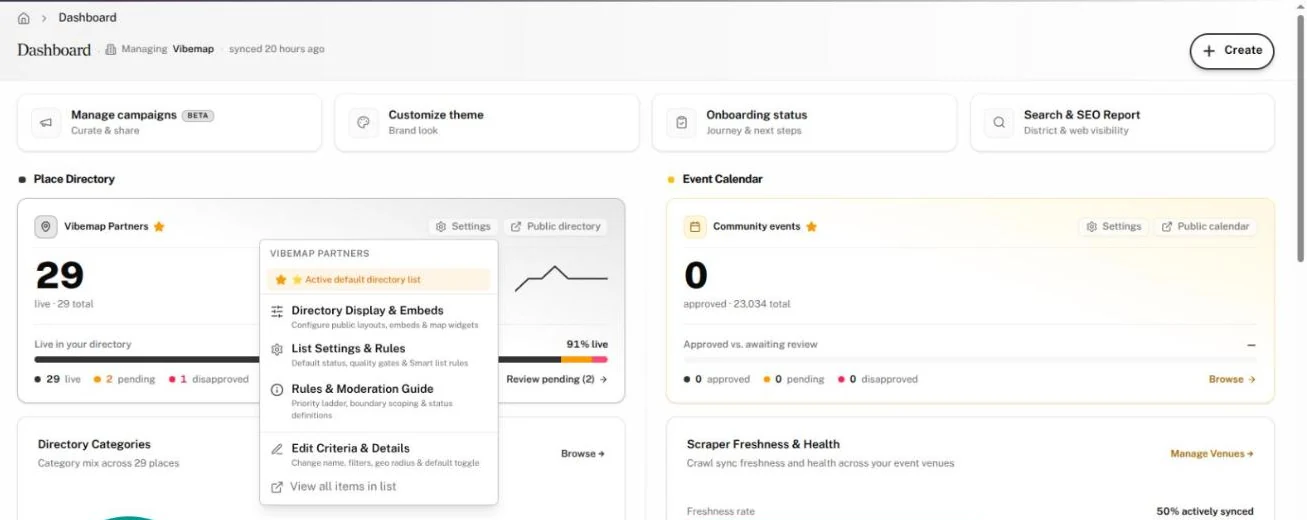
- Settings. A menu for that list: Set as default, Directory Display & Embeds, List Settings & Rules and Rules & Moderation Guide, plus Edit Criteria & Details and View all items in list when a list is active.
- Public directory or Public calendar. Opens the public page in a new tab.
- The headline number. For places, how many of your places visitors can see now ("live"), beside the total. For events, how many are approved, beside the total.
Review what's pending
When events wait on review, a bar above the columns reads N awaiting review · M approved. Click Review events to open the Events page on the Pending tab.
Under each headline, a bar splits your records into live (or approved), pending and disapproved; for places, hidden places show in brackets. Each count links to the Places or Events page on that tab. The link beside the bar names the next step, in this order: Review pending (N), View disapproved, Fix hidden (N) or Browse. Fix hidden opens the Hidden tab on Places.
If your account includes Campaigns, Manage campaigns above the columns opens them.
Place Directory cards
| Card | What it shows | Click to |
|---|---|---|
| Directory Categories | Your top five categories as a donut and a list, each with its count and a trend line, plus up to eight TOP TAGS. | Open Places filtered to that category or tag. Browse → opens all places. |
| Business Openings & Closures | Places added and places permanently closed, month by month. Pick 6 Months, 1 Year, 3 Years or 5 Years. Recent Status Changes lists the latest five. | Open a place. |
| Recently updated places | The five places changed most recently, with a Pending badge on any not yet reviewed. | Open a place. |
Event Calendar cards
| Card | What it shows | Click to |
|---|---|---|
| Scraper Freshness & Health | How many of your event venues Vibemap syncs regularly, and how many have no events or a failing link. | Manage Venues → opens your event venues. |
| Event Sourcing & Ticketing Audit | Upcoming events split between Direct Venue Sites and Ticketing Platforms, with each platform's share. | View Coverage → opens the coverage report. |
| Event Categories | Your top five event categories. | Open Events filtered to that tag. |
| Event schedule | A month calendar shaded by how many upcoming events fall on each day. Toggle this month and next. | — |
| Next up | The next five upcoming events, with their review state. | Open an event. All events → opens the full list. |
Across your directory
The band at the bottom covers places and events together.
| Card | What it shows |
|---|---|
| Engagement | Link opens: how many times people have opened your maps, calendars and shared lists, all time. The number appears once you have at least one shared link. |
| Data refresh | When Vibemap last checked your sources. Last 7 days counts new and updated places and events. "No automatic refresh yet" means no scheduled refresh is set up; your Vibemap contact can turn it on. |
| Recent Activity & Automation ROI | The five latest changes to your records and who made them. When automated collection did the work, a banner adds up the Hours Saved, counting 5 minutes per place and 3 per event. |